Meal Planner & Grocery List
- 4.5
- Rating
- 1.00M
- Installs
- Free
- Price

 Analysis by App-foxy
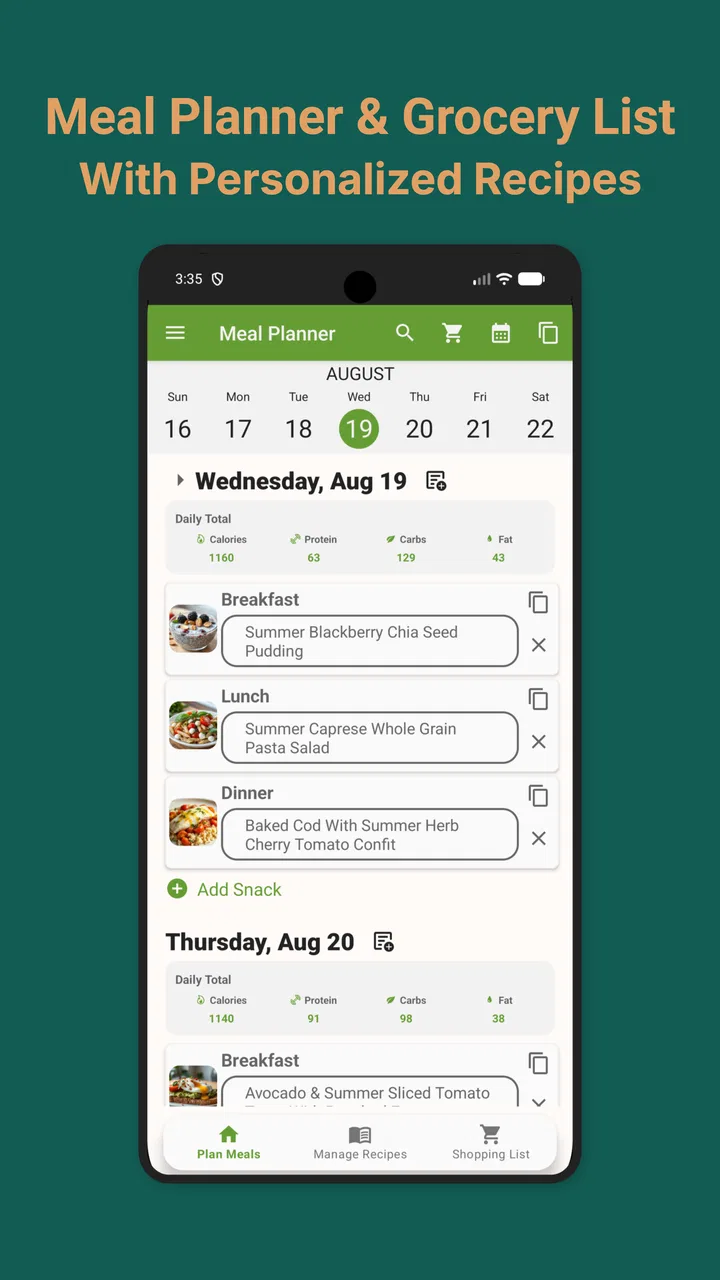
Planning meals sounds simple until the week becomes busy, the fridge is half empty, and a shopping trip turns into a collection of guesses. I tested Meal Planner & Grocery List as a practical Food & Drink app, and my impression is that it works best when you treat it as a weekly planning desk rather than a magic solution to household organization. It gives you one place to think through meals, keep recipes, and prepare a family shopping list, which is much easier than juggling scraps of paper, saved posts, and a general notes app.
What I like most is the way the app encourages a complete routine: decide what you might eat, connect those decisions with recipes, and then turn the result into a list before going to the store. That sounds ordinary, but the order matters. Many meal-planning tools are good at displaying recipes yet leave the actual shopping work to you. This app is more useful when your real problem is the gap between “we should cook this week” and “what exactly do we need to buy?”
Meal Planner & Grocery List is free to install, with optional in-app purchases ranging from $0.49 to $19.99 per item. It is made by JoJo Apps: Meal Planner and Shopping List, has an Everyone content rating, and runs on Android devices using version 6.0 or later. Its current version is 5.40.6, and its broad appeal is reflected in a 4.6 average from around 21 thousand ratings and more than a million installs. Those figures suggest a well-established app, but they do not remove the need to see whether its planning style matches your habits.
You May Also Like

 Blood Strike: 2.5 Anniversary
Blood Strike’s Loadouts Turn Every Drop Into a Tactical Gamble
A close look at Blood Strike’s custom loadouts: how fast access to signature weapons reshapes its battle royale rhythm, rewards preparation, and narrows the gap between fights.

 Pandora - Music & Podcasts
Pandora’s Music Is Easy to Start, but Harder to Recover
Pandora’s strength is its low-effort path from a seed to a station. Its weak spot is how much confidence it asks you to place in connection, setup, and quiet recovery.

 8 Ball Pool
 Is Built on Rivalries, Rematches, and Routine
A close look at the rivalries, rematches, shared routines, and unanswered safety questions that turn a quick pool match into a persistent mobile community.

 Samsung Music
’s Quiet Strength Is Playing What You Already Own
Its reach comes less from spectacle than from dependable access to a personal library. That simplicity is both the app’s strongest retention engine and its ceiling.

 AccuWeather: Weather Radar
AccuWeather Review: A Quick, Clear Forecast for Everyday Decisions
For everyday plans, the best forecast is the one you can understand quickly. AccuWeather makes rain timing, radar, and local conditions easy to act on, with a few trade-offs.

 Hill Climb Racing
Why Hill Climb Racing Still Turns Crashes Into One More Run
A tiny car, a bumpy hill and one more upgrade: Hill Climb Racing keeps resurfacing because its simple chaos makes every near-miss feel personal.
More From Our News Desk



Getting past the first points of friction
I find the first hurdles are usually about setting up a routine, not learning a complicated system. This section looks at how to begin with a small, realistic menu, check that recipes and days are connected as intended, and make the shopping list easier for someone else in the household to use. A little care at this stage can make later changes less frustrating.
Start with one week, not your entire cooking life
The easiest mistake is trying to build a perfect meal system immediately. I recommend starting with only the next few days. Add the meals you already know you are likely to cook, save one or two recipes you genuinely use, and create a short shopping list. This gives you a chance to understand the app’s rhythm without spending an evening entering every favorite dish you have ever made.
A weekly plan becomes much more useful when it reflects real behavior. If you usually eat leftovers, include that in your thinking instead of assigning a completely different recipe to every day. If one family member cooks only on certain evenings, plan around that constraint. The app can organize your choices, but it cannot decide whether Tuesday is a realistic night for a complicated meal. That judgment still belongs to you.
I also found it helpful to separate “planned” from “possible.” A recipe you are excited about is not necessarily a meal you will make this week. Keeping the first plan modest reduces the disappointment that comes from an ambitious menu and makes the grocery list more trustworthy. The best list is not the longest one; it is the one that matches what you will actually use.
Check the basics before blaming the app
When something appears missing, my first check is the planning step itself. Was the meal added to the correct day? Was the recipe saved before trying to use it in the plan? Was the ingredient list reviewed after selecting the recipe? These are small points, but they explain many apparent failures in organizer apps. A shopping list can only reflect the meals and recipes that have been connected properly.
I would also check whether the issue affects one item or the whole workflow. If one ingredient looks wrong, inspect that recipe and its entry. If the entire plan seems unavailable, close and reopen the app, confirm that you are looking at the intended week, and repeat the action slowly. This kind of basic reset is more useful than repeatedly tapping the same control and assuming the app has ignored you.
Another practical check is consistency in your ingredient wording. “Tomatoes,” “tomato,” and “cherry tomatoes” may represent different shopping decisions to you, even if they sound related. Before building a large list, review how ingredients are written in your recipes. Consistent names make the final list easier to scan and reduce the chance of buying duplicates.
Why the shopping list deserves a second look
The shopping list is where this app can save the most time, but it is also where a little preparation pays off. I would not walk into a supermarket immediately after creating a plan without reading through the list once. Recipes may include pantry staples you already have, ingredients you prefer to substitute, or quantities that need adjusting for the number of people eating.
My preferred routine is to review the list at home, remove what is already in the cupboard, and group my thinking by the way I move through the store. Even if the app does not perfectly mirror the layout of your local supermarket, this review prevents the common problem of discovering at checkout that you bought an ingredient twice while forgetting a key item.
For family shopping, the list is particularly useful when one person plans meals and another does the shopping. Write ingredients clearly and avoid relying on personal shorthand that another household member may not understand. A list can be shared in spirit only if the person using it can interpret every item without having to call you from the store.
Recovering when a plan goes wrong
Even a sensible menu can be derailed by a changed schedule or a meal that no longer fits the week. Here I focus on correcting only what has changed, keeping useful parts of the plan intact, and checking the list after revising a meal. That approach helps distinguish a planning adjustment from a problem with the app itself.
What to do when a recipe or meal seems out of place
When a planned meal is not where I expect it, I avoid rebuilding the whole week. I first return to the relevant day, check the selected recipe, and correct only that entry. Recreating everything creates a second problem: it becomes harder to tell whether the original issue was a selection mistake or a genuine app problem.
If the list contains an ingredient from a meal you no longer want, remove or revise the meal first, then inspect the list again. The important principle is to repair the source before repairing the result. Editing the shopping list alone may hide the unwanted ingredient temporarily while leaving the old meal in the plan, which can cause confusion later.
For a plan that has become too complicated, I would simplify rather than start over. Keep the meals you are certain about, discard the uncertain ones, and add them back gradually. This is a useful recovery technique because it preserves the work that is still valid. It also reveals whether the trouble comes from one recipe, one day, or the overall structure of the week.
Handling a week that changes at the last minute
Real schedules rarely respect a meal plan. A late meeting, an unexpected invitation, or a child refusing dinner can make a carefully arranged menu feel obsolete. In that situation, the app is more valuable as a flexible record than as a strict timetable. Move your attention to the meals that remain realistic and revise the shopping list so it reflects the new plan.
I would keep at least one low-effort option in the week. This is not a special feature; it is a planning habit that makes the organizer more resilient. If every planned meal requires fresh preparation, the first disruption can make the whole list feel useless. A simpler fallback gives you something to cook without abandoning the system.
Leftovers also deserve deliberate treatment. Instead of thinking only in terms of recipes, think in terms of how one meal affects the next day. A larger dinner may reduce the need for another full cooking session. This approach makes the shopping list more economical and helps prevent buying ingredients for meals that your household will never reach.
When the app is not the cause
Some problems that feel like app problems are actually planning problems. A list can be accurate and still feel wrong if the original recipe was entered with an unsuitable quantity. A meal can be correctly scheduled and still be impractical because the preparation time does not fit the day. A family can have a complete list and still waste food if nobody checks what is already at home.
Before changing the app, compare the result with your own decisions. Did you plan for the right number of people? Did you account for meals outside the home? Did you include ingredients that are already available? Did you choose a recipe with optional toppings or substitutions that should not become mandatory purchases? These checks often solve the issue faster than reinstalling or repeatedly editing entries.
Device conditions can matter too. If the app behaves unusually, make sure the operating system meets its Android 6.0 minimum, then try the ordinary steps of closing and reopening it and checking that the intended content is still selected. I would avoid deleting information as a first response. A cautious, reversible check is better than a dramatic reset when the problem may be a temporary display or selection mistake.
Where it compares well with ordinary alternatives
A paper notebook is more flexible for free-form notes, and a general notes app is faster for typing a quick list. Those options are excellent when you only need a handful of reminders. Their weakness appears when meal choices, recipes, and groceries begin to drift apart. You may remember the dish but forget an ingredient, or write the ingredient down without remembering why you bought it.
Recipe-only apps usually do the opposite: they help you discover and read recipes but may not fit the way your household actually shops. Meal Planner & Grocery List sits between those approaches. Its value comes from connecting the planning decision with the shopping task. That makes it a better choice for someone who repeatedly asks, “What are we eating this week?” rather than someone who only wants inspiration for tonight.
It is not automatically better than a dedicated grocery app for people who care mainly about store-specific organization, detailed price tracking, or highly specialized inventory management. If your priority is comparing costs or managing a large pantry, a more focused tool may suit you better. This app makes more sense when meals are the starting point and groceries are the consequence.
Who will get the most from it
I think the strongest audience is a household that cooks regularly but plans inconsistently. Parents, couples, roommates, and anyone trying to follow a particular eating pattern can use the weekly structure to reduce repeated decisions. The app is also useful for a person who keeps recipes in several places and wants a more deliberate way to bring them into the week.
It can help people who are trying to waste less food, but only if they review the list and adjust portions thoughtfully. The app can organize what you intend to buy; it cannot know whether your household dislikes leftovers, whether a package size is larger than your recipe needs, or whether an ingredient is already close to expiring. The environmental and financial benefit comes from your review habits, not from automation alone.
I would be less enthusiastic for someone who rarely cooks, eats spontaneously, or wants a sophisticated nutrition dashboard. If you only need an occasional reminder to buy milk, this may feel like more structure than you need. Likewise, if your cooking revolves around a highly specialized database or precise nutritional targets, you may prefer a tool designed around those requirements rather than a broad meal-and-shopping workflow.
Small habits that make the app work better
Build the first plan around meals you already know, then use the saved recipe workflow to expand it gradually.
Review the shopping list after every meaningful plan change instead of trusting an old list to remain accurate.
Use consistent ingredient names so similar items are easier to recognize and less likely to be purchased twice.
Keep one flexible meal available for a disrupted day, especially when the rest of the week requires more preparation.
Check cupboards and the refrigerator before shopping; the app organizes your intended purchases, not your current inventory.
These habits reveal an important trade-off. The app reduces mental clutter, but it does not remove the need for a short planning review. If you spend a minute checking quantities, leftovers, and existing supplies, the list becomes much more dependable. If you treat the first generated list as final, the convenience is less impressive.
My practical verdict
After using Meal Planner & Grocery List as a weekly organizer, I see it as a sensible middle ground: more connected than a handwritten list, less specialized than a full household inventory system, and more practical than a recipe collection that leaves shopping to memory. The free starting point makes it easy to test without committing immediately, while the optional purchases mean some users may eventually encounter paid extras during longer-term use.
The app is at its best when you create a realistic plan, keep recipes organized, and review the resulting groceries before leaving home. Its weakest moments come when users expect it to understand household preferences, pantry contents, portions, and sudden schedule changes without any input. Those are not small details; they determine whether meal planning feels helpful or restrictive.
My recommendation is straightforward: try it if your main frustration is turning weekly meal ideas into a usable family shopping list. Start small, test the workflow with a few meals, and pay attention to how easily you can correct changes. Skip it if you want only spontaneous recipe discovery, advanced food-cost analysis, or a highly detailed nutrition system. For everyday planning, though, the most useful feature is the connection between what you plan to eat and what you need to buy. That simple link is enough to make the app worthwhile for the right household.
Meal Planner & Grocery List is a free Food & Drink app for Everyone, and its release on May 6, 2021 gives it a mature place in this category. I would recommend judging it by one practical question: after planning a normal week, does your shopping trip become clearer? If the answer is yes, its straightforward approach can earn a regular place in your routine.
FAQs for Meal Planner & Grocery List
01What features does the Meal Planner & Grocery List app offer?
The Meal Planner & Grocery List app provides a comprehensive set of features including customizable meal plans, a smart grocery list generator, recipe suggestions, and dietary preference filters. It also allows users to track nutritional information, set reminders for meal prep, and share plans with family or friends.
02Is the Meal Planner & Grocery List app suitable for specific dietary needs?
Yes, the app is designed to cater to a wide range of dietary needs. Users can select specific dietary preferences such as vegan, gluten-free, keto, or paleo. The app then suggests recipes and meal plans that align with these preferences, making it easier to maintain a balanced diet.
03How user-friendly is the Meal Planner & Grocery List app?
The app features an intuitive interface that is designed for ease of use. With simple navigation, drag-and-drop meal planning, and clear instructions, both beginners and experienced users can efficiently plan meals and organize grocery lists without any hassle. Additionally, the app offers a tutorial for new users.
04Does the app integrate with other tools or devices?
Yes, the Meal Planner & Grocery List app integrates smoothly with various tools and devices. It can sync with calendars to schedule meals and reminders, and it may offer compatibility with fitness trackers to monitor nutritional intake. This enhances the app’s functionality for users who rely on multiple devices.
05Is there a cost associated with using the Meal Planner & Grocery List app?
The app offers a free version with basic features, which is suitable for most users. However, a premium subscription is available, unlocking advanced features such as personalized meal suggestions, additional dietary options, and an ad-free experience. Users can choose a plan that best suits their needs.
Pros
- User-friendly interface with intuitive design.
- Customizable meal plans tailored to preferences.
- Syncs across devices for easy access.
- Includes nutritional info for healthier choices.
- Saves time with auto-generated grocery lists.
Cons
- Limited recipe variety in free version.
- Requires internet for syncing features.
- Occasional bugs in grocery list updates.
- Subscription needed for premium features.
- Not all dietary needs are covered.

Meal Planner & Grocery List
Gallery